Responsible AI · Article
The Role of UX in Designing Responsible AI
A practical look at provider and deployer responsibility, built from a real AI content-generation feature, not policy theory.
Responsible AI · Article
A practical look at provider and deployer responsibility, built from a real AI content-generation feature, not policy theory.
I gave a content generation tool a simple prompt: a lifestyle image for clothing. It came back with a photorealistic image of a person; smiling, wearing a dress, looking exactly like the kind of photo a brand would use as a customer testimonial. Nothing about it said it wasn't real. Nothing in the review forced either me or the tool to take editorial responsibility.
That gap, a synthetic "customer" photo with no disclosure built into the product, is a small, specific example of a much bigger problem. AI policy and governance can feel like someone else's department, but it shapes product development far more than most of us realize, UX design included.
As a UX designer, getting your head around artificial intelligence can feel overwhelming. But our role goes beyond designing AI features or reaching for AI prototyping tools. We're integral to how AI systems get governed, and we can help lead the conversation on what responsible AI design actually looks like.
The classic questions (why are we designing this feature, and who are the primary users) still matter. But they're not enough on their own anymore. You also need to ask:
Companies need to pay close attention to this right now. Article 50 of the EU AI Act is already in force, and there are real penalties for companies that don't meet these requirements, especially if you're selling into EU markets.
Let's walk through those four questions using the project that produced that testimonial photo.
The EU AI Act lays out clear expectations for the different roles and responsibilities involved in designing and developing AI systems. Under the Act, your company and your customers sit in different legal roles, and Article 50 splits obligations accordingly.
The Act defines six of these roles, collectively known as "operators" (Art. 3(8)):
| Role | Definition |
|---|---|
| Provider | Develops an AI system (or has it developed) and places it on the market under its own name or trademark |
| Deployer | Uses an AI system under its own authority, for professional purposes (not personal or non-professional use) |
| Authorised representative | An EU-based person or entity with a written mandate from a non-EU provider to carry out the provider's obligations on its behalf |
| Importer | An EU-based person or entity that places on the market an AI system bearing a non-EU entity's name or trademark |
| Distributor | Anyone in the supply chain, other than the provider or importer, who makes the system available on the EU market unchanged |
| Product manufacturer | Places a product on the market with an AI system integrated as a safety component, under its own name |
A single organization can hold more than one role, depending on what it's doing with a given system: a company might be the provider of one AI system and the deployer of another it licenses from someone else.
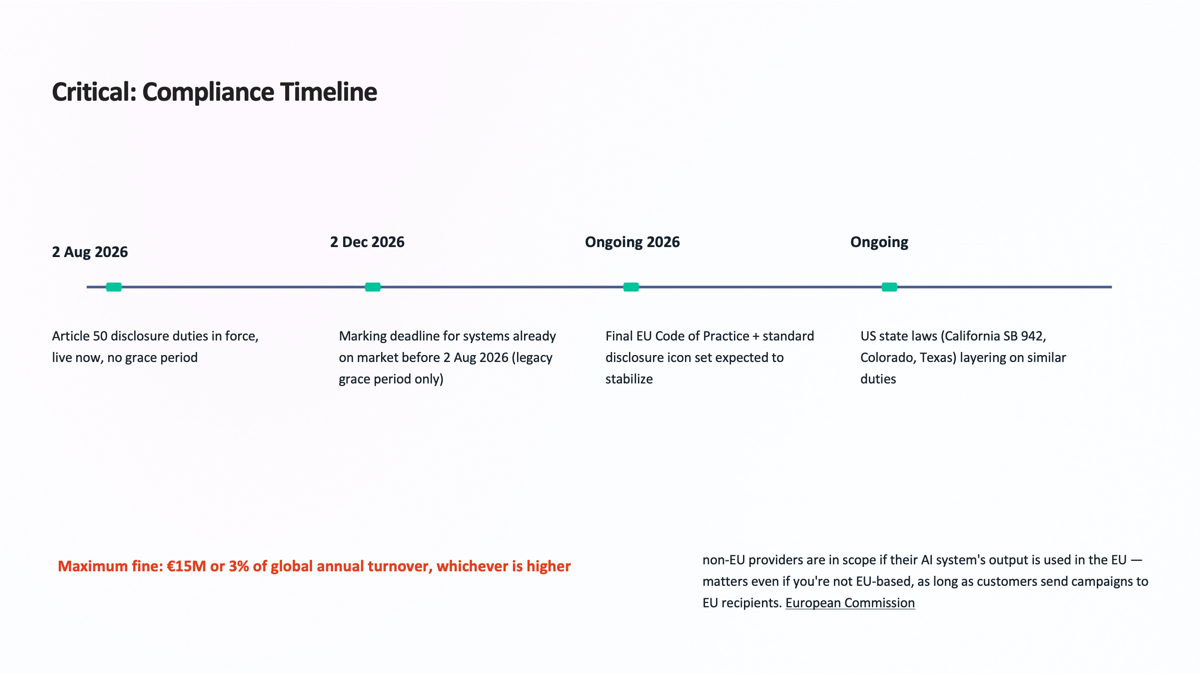
One nuance worth keeping in your back pocket: if a downstream actor substantially modifies an AI system, or puts its own name or trademark on it, provider obligations can shift to that downstream actor, even if they didn't build the system in the first place.
This is exactly why role allocation is often spelled out explicitly in vendor and reseller contracts, rather than left to default classification. The maximum fine for non-compliance is €15M or 3% of global annual turnover, whichever is higher.
Once you know your role, it's much easier to find the assessments that apply to you and your industry, and translate them into feature design. A good place to start is completing the ISO/IEC 42001 Annex A controls with your team (more on how designers can actually use that document in a future article). And don't skip your own company's internal AI guidelines, if you have them. They're usually more specific to your product than the regulation alone.
Designing with guardrails is about more than slapping an "AI-generated" label on a screen next to an approve/reject button. Guardrails should be tailored to the specific feature, but a few general principles hold once you understand your role and the ethics that apply to it. It's also worth knowing which exemptions apply to which features, since they don't all carry the same obligations.
Edge cases: Most AI failures come down to a gap between training data and the real world, which is basically what happened with that testimonial photo. Work with your team to explore what your training data actually includes, what it might be missing, and where you need to be upfront with users. That includes disclosing how data is used and how long it's retained, wherever that's relevant. Research is usually what surfaces the edge case you didn't think to ask about.
"We're all responsible for building a sustainable environment for AI systems, technically and socially. This isn't something we get to leave to a handful of people."
Yoshua Bengio, paraphrased from a keynote at HCI InternationalNow let's get into the actual project. Most details have been redacted for public sharing.
You're a designer working with an AI content management company that builds marketing tools for social media companies and influencers, helping them engage their customers and followers across social posts, emails, and text messages. The product uses content blocks that let customers assemble relevant content for their audiences. At first glance, the challenge feels familiar: how do you make AI-assisted content creation feel intuitive, trustworthy, and efficient? Your job is to design these content blocks, and the guardrails that make the whole thing responsible.
This distinction isn't just legal housekeeping: it fundamentally shapes what the UI needs to communicate, to whom, and when.
As the provider of a generative AI system, the platform has to make sure every AI-generated output, text or image, is marked in a machine-readable format and detectable as artificially generated or altered.
This isn't optional, and the exemption is narrow: assistive editing or minor, non-substantial changes don't trigger the requirement, but full content generation does. The regulation expects a multi-layered approach to marking: metadata, embedded watermarks, and fingerprinting as a fallback. The bar: marking has to be effective, reliable, robust, and interoperable.
The deployer's obligation, on the other hand, is to the end recipient: the person actually receiving the email. Under Article 50, deployers must:
Rule of thumb for brand protection: the provider should mark AI-generated content regardless of whether the deployer's disclosure exemption applies. That exemption covers the deployer's obligation to their audience, not the provider's marking obligation.
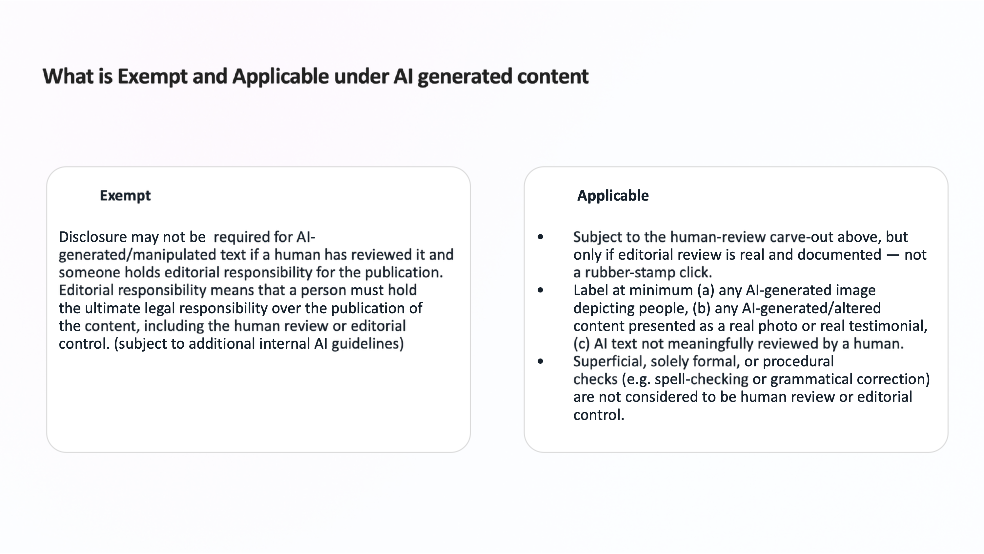
Disclosure may not be required when a human has genuinely reviewed the content and holds editorial responsibility for it, meaning real legal responsibility over publication, not a spell-check. (Subject to additional internal AI guidelines.)
It is required for any AI-generated image depicting a person, any AI-altered content presented as a real photo or testimonial, and any AI text that hasn't been meaningfully reviewed by a named person.
Below is an example of how some of this research made its way into a sample system. This screen was generated from a simple prompt. I intentionally left a few things out to see how well these systems reason about guardrails on their own.
This exercise crystallized something I've been working toward: designing responsibly isn't about bolting on a disclaimer or a toggle. It's about understanding the legal architecture your product sits within, mapping that architecture to user roles, and building guardrails that are legible, actionable, and proportionate to the decision being made.
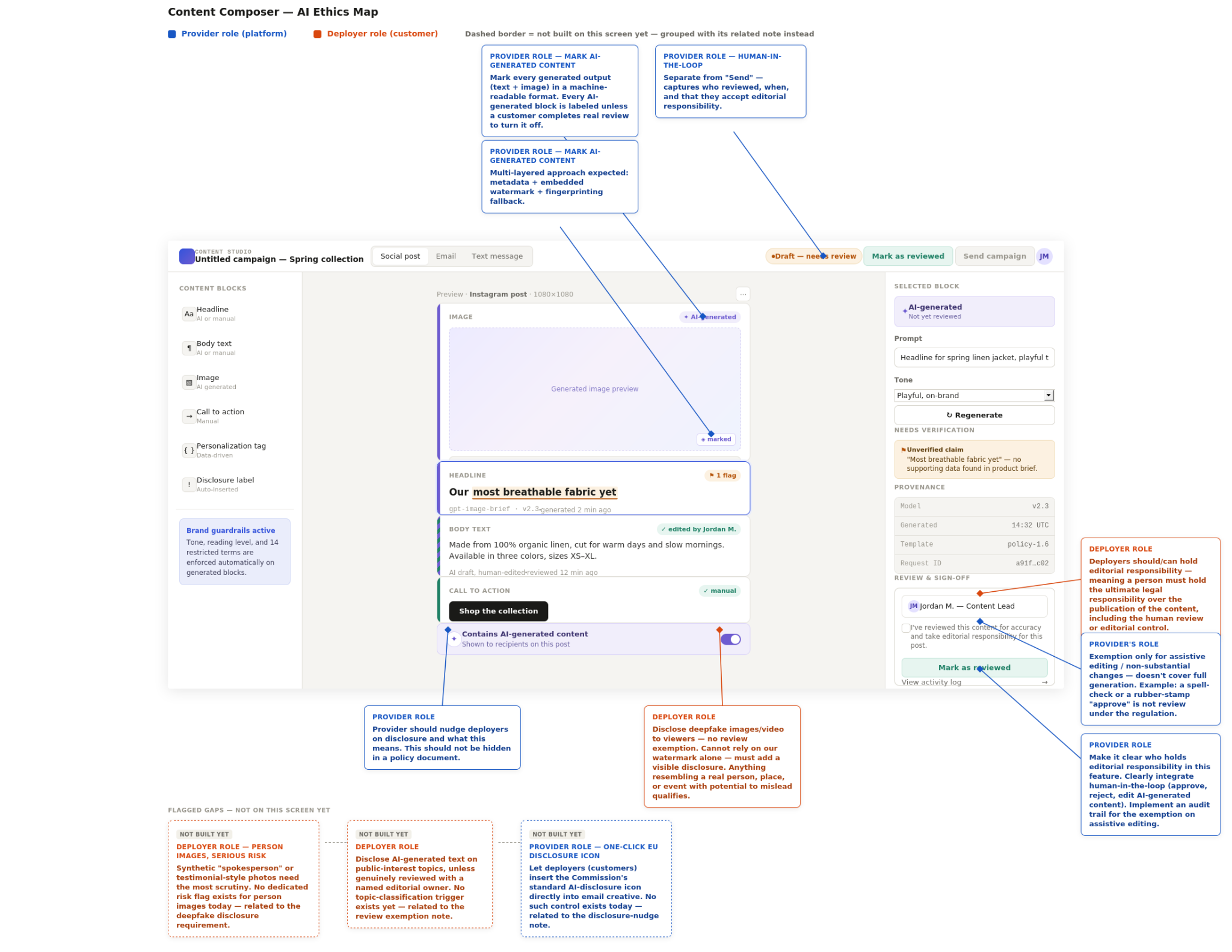
Take the "Mark as reviewed" button sitting next to Send. That split exists because of one specific regulatory nuance: the human-review exemption only counts if the review is real — a named person, a documented decision not a rubber-stamp click. A generic "Approve" button can't tell the difference between someone who actually checked the copy and someone who just wanted to ship the campaign. Splitting those two actions apart, and requiring a name behind the review, was the smallest change with the most legal weight on the whole screen.
The above is for illustration purposes and can be adjusted to reflect custom design systems, such as creating this as a wizard flow or some confirmation in dialogs.
As you can see, these guardrails cover human-in-the-loop review, build trust, and bake in explainability. Explainability isn't just a technical property of an AI system. It's a design property of the interface around it. A guardrail is only as good as the user's ability to understand why it's there.
Gartner research found that 68% of consumers frequently wonder whether the content they're seeing is real, but simply labeling something as AI-generated doesn't automatically restore their confidence.
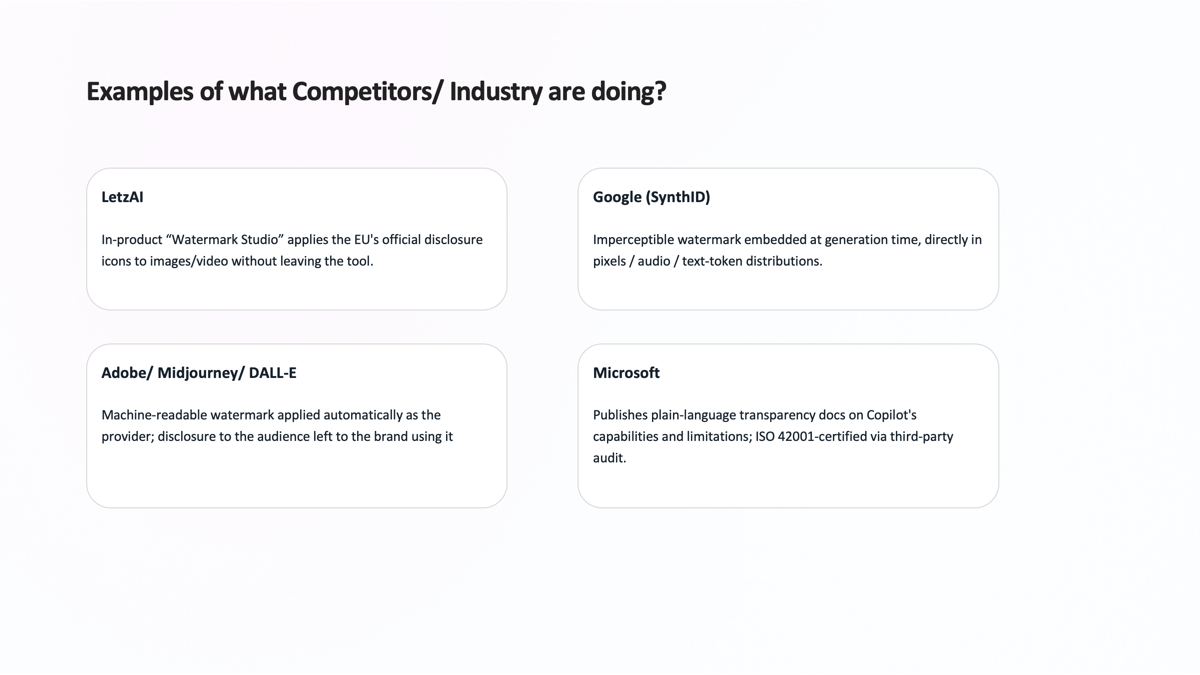
There's still a real gap in the email marketing industry when it comes to labeling AI-generated content well. It's an ongoing conversation, and the approaches above (from imperceptible watermarking to plain-language transparency docs) show there's no single accepted standard yet.
Not all of these carry equal weight. The review-vs-approve distinction is probably the one to get right first. It's the single control that decides whether your "human review" exemption actually means anything, or just looks good in a compliance doc. A close second is the disclosure label itself: showing it by default, instead of making deployers dig for a setting, is what keeps "we told them" from becoming a legal argument nobody outside the company believes.
Beyond those two, a few more worth building into the process:
None of this is instinctive at first. Reading a regulation like a design brief takes practice. ISO/IEC 42001 and the EU AI Act itself are worth the slog if you want the primary sources, and there are a few solid Coursera courses if you'd rather have some structure around it.
The designer's role in an AI-native product is to close the gap between what the regulation requires and what the deployer can actually do in creating a great user experience, without making compliance feel like a punishment for using the product.